
Costco gold restock alerts: choose what to watch
To get notified when Costco gold returns, choose an online product or a nearby warehouse, then set an alert for that source. Costco.com stock and warehouse stock are separate; an alert for one does not cover the other.
In our trailing 90-day record, 39.2% of 849 completed online restocks ended within an hour. An alert helps you notice a restock; it cannot reserve the gold.
By Gold Alerts · Guide revised September 24, 2026 · Independent of Costco
Where do you want to buy?
Start with the purchase you would actually make.
Follow an online product
Choose the exact bar or coin, including its weight and Costco item number. An online restock alert watches that product’s return to stock and stays active for later restocks.
If it is available already, check Costco now. Saving a restock alert watches for a future return; it does not send an immediate in-stock message.
Choose a product →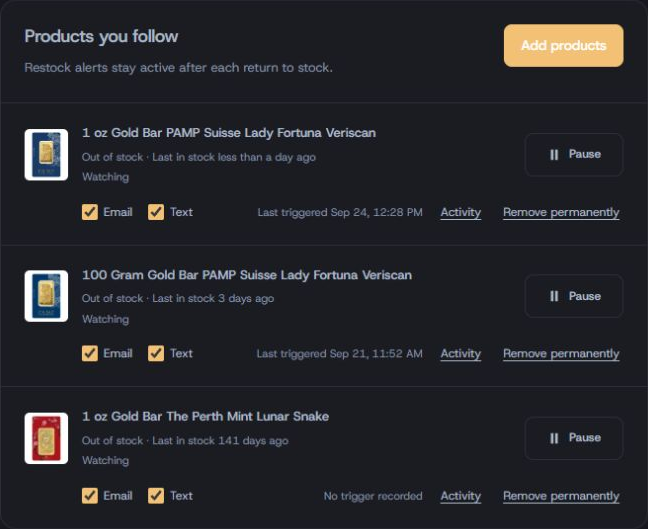
Follow nearby warehouses
Search by ZIP or city, check each store’s recorded availability, and choose the warehouses you would drive to. Save an in-store restock alert for your selected stores and metal.
Read the last-check time before making a trip. A warehouse observation is not a reservation or a guarantee that stock remains when you arrive.
Find your warehouses →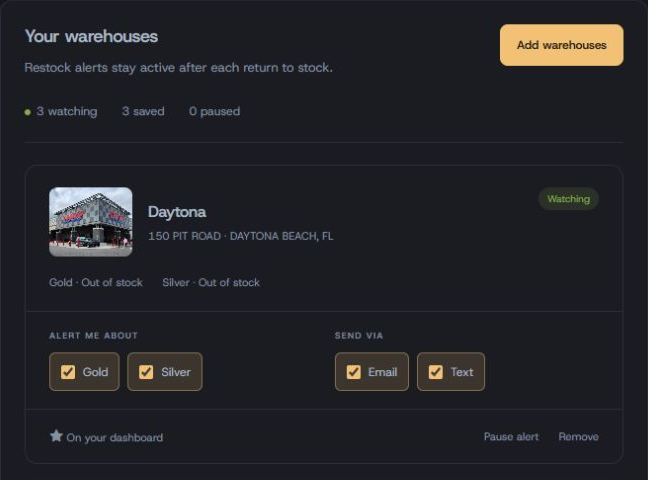
App screenshots captured September 24, 2026. Stock and settings shown are examples, not current availability.
Want both? Set up both alert types. Costco also provides warehouse availability lookup for supported items; a manual lookup and a restock notification serve different purposes.
From choosing a product to receiving an alert
No purchase profile is needed for a standard restock alert.
- Step 1
Choose what to watch
Open a product from the online inventory, or a store from the warehouse finder. Start your trial and finish creating your account. Starting checkout does not save an alert.
- Step 2
Choose how to hear about it
Select email, text, or both where offered. For text messages, add your phone number and check your notification settings, time zone and quiet hours.
Quiet hours can delay delivery until after a short restock has ended.
- Step 3
Save and check your alert
Check that your product row or warehouse card says Watching and the save has finished. Confirm your selections and delivery choices.
Allow the sender in your inbox and check your phone’s notification settings.
Add a profit threshold only if you need one
A profit alert compares a dealer bid with your configured costs and rewards. A restock alert tells you about availability. Start with the restock alert if you simply want to buy a bar.
Compare ways to find a Costco gold restock
Choose based on coverage, delivery and how much setup you want to maintain.
We operate Gold Alerts. This is a comparison of approaches, not a measured ranking of other services. Checking intervals, delivery channels and coverage vary by provider and plan.
| Approach | Useful when | Check before relying on it |
|---|---|---|
| Check Costco yourself | You want to check online listings or a particular warehouse when you are ready to buy. | You need to repeat the lookup. Costco’s warehouse availability feature applies only to supported items and stores. |
| Website-change monitor | You want to configure your own alert for a selected page or availability message. | Check frequency, local versus cloud operation, and conditions that distinguish availability from price or layout changes. |
| Community posts or bots | You already follow a community that shares Costco gold finds. | Check the post’s time, item number and location. Coverage and notification controls depend on that community. |
| Deal newsletter | You want a roundup of products, prices and shopping context. | Check whether alerts are immediate or sent in a digest. Stock may change between publication and reading. |
| Dedicated restock service | You want a service to maintain the stock checks and deliver alerts. | Ask which products and warehouses it covers, how changes are confirmed, which delivery channels it supports and what the subscription costs. |
| Gold Alerts The service publishing this guide | Online product alerts and selected-warehouse alerts, with email and Premium SMS delivery. | Save each alert explicitly. Review quiet hours and delivery settings. The trial requires a card; continued Premium costs $15/month. |
How to set up a website-change monitor
- Open the Costco listing or category page you want to watch.
- Select the part that reports availability, rather than the entire page.
- Add a condition for the availability text, if your tool supports it. A price change alone should not be your restock signal.
- Check the polling interval and whether the monitor needs your browser to remain open. Test the notification channel.
- Revisit the selection if Costco changes the page or removes the listing.
For a concrete example, Distill documents conditions for filtering page changes and how checks and notifications work. We have not benchmarked its Costco detection or delivery performance.
How to check Costco directly
Use Costco’s precious-metals category for online shopping. For a local purchase, use Costco’s warehouse lookup where available, or contact the warehouse with the item number.
Costco’s online inventory guidance says a missing item may be unavailable online or out of stock. A missing listing does not tell you when it will return.
How long do recorded gold restocks last?
Our online stock history gives context for how often to check.
Statistics calculated · trailing 90 days · cached for up to one hour
- Completed online restocks · 90 days
- 849
- Ended within one hour
- 39.2%
- Median recorded duration
- 3h 5m
- Fastest confirmed sellout
- 5 min
These duration figures use completed windows only. 5 additional windows were still open at calculation time and are excluded from the duration summary. They do not predict how long the next restock will last.
Is there a best day or time to check?
Across 854 recorded online restock events in the trailing 90 days, Monday had the most events, and 12 PM Eastern was the busiest hour. Ties use the first day or hour in calendar order.
That is a historical concentration, not a restock schedule. Products can return at different times; choosing an alert avoids depending on one daily visit.
What a checking interval can—and cannot—tell you
The figures below are modeled, not measured delivery results. They estimate whether a periodic check overlaps one of our recorded online availability windows.
| Time between checks | Modeled overlap |
|---|---|
| 24 hours | 35.7% |
| 1 hour | 77% |
| 5 minutes | 100% |
| 30 seconds | 100% |
For a window lasting D and a check interval I, the model uses min(1, D / I), assuming a random point in the checking cycle. It averages that probability across the windows. Still-open windows count as overlaps for every interval, which can inflate the estimate.
A 100% modeled overlap is not a 100% alert or purchase success rate. This calculation excludes confirmation time, failed checks, message delivery, quiet hours and the time you need to act. It does not measure any vendor’s performance.
Where the data comes from
These are Gold Alerts’s recorded Costco.com gold availability windows. Adjacent price segments are combined so a reprice during continuous availability does not count as a new restock. Day and hour summaries use recorded restock events in Eastern time, a separate count from availability windows.
Repeated scans confirm stock changes. Very short appearances that were not confirmed never entered this dataset. Recorded durations therefore omit some short-lived availability and are not exact shelf or checkout availability times. Warehouse inventory is excluded from these online duration figures.
The statistics refresh on demand with an hourly cache. The calculation timestamp above dates the data; the revision date at the top dates this guide.
Check the listing before you buy.
Follow the alert to the correct product or store. You buy from Costco; Gold Alerts does not sell or reserve bullion.
- Match the item. Check weight, item number and online versus warehouse availability.
- Recheck the price. The alert records an observation; Costco’s current price and checkout determine what you pay.
- Read the current terms. Confirm membership, quantity limits, return restrictions and delivery requirements on the listing.
- For a warehouse trip, check the timestamp. Contact the store if you need to confirm availability before driving.
Before you switch notifications on
What the alert watches, what it costs and why a message might arrive late.
Can I use Costco to check warehouse stock?
Yes. Costco documents warehouse availability lookup for supported items at selected stores. Online inventory and warehouse inventory are separate. Checking availability yourself does not set up a restock alert with our service.
Does one alert cover online and in-store gold?
No. An online restock alert follows a selected Costco.com product. An in-store restock alert follows your selected warehouses and metal. Set up both if you would buy through either channel.
What does it cost?
The advertised Gold Alerts Premium trial lasts 5 days, requires a credit card and continues at $15/month unless canceled. SMS is the Premium capability. Email alerts, inventory access and purchase profiles are account features; they are not separately Premium-gated.
Will a restock alert send immediately if the product is already in stock?
No. An online restock alert watches for the next return to stock and stays active for later restocks. If the product is available now, check the current Costco listing. Saving an alert does not place an order or reserve stock.
Why did an alert lead to a sold-out product?
Stock may sell out between the recorded check, confirmation, message delivery and your visit. Quiet hours and device notification settings can delay when you see the message. Verify the item number and the alert time, then check that the alert remains active for a later restock.
Do I need to set up profit calculations first?
No. Standard restock alerts watch availability. A purchase profile is relevant when you want personalized cost or resale calculations; it is not required just to follow a product’s return to stock.
Pick one product or a few nearby stores.
Browse the recorded inventory, then save an alert for what you want to buy.
Browse online gold →Credit card required.
Sources: our recorded online stock history; Costco warehouse availability guidance; Costco online inventory guidance; Distill’s monitoring conditions. External guidance checked September 24, 2026. Report a correction.