
Favorite warehouses
Star stores to keep them on your dashboard. Check the recorded stock and observation time before deciding to drive.
Choose how you want to buy, follow the steps, then check that your alert is saved. You can add more products and stores later.
Keep this guide open while you work: app links open in a new tab. Screenshots are from the app on September 24, 2026; their products, stock and settings are examples, not your current account.
Online stock and warehouse stock are separate. Follow both paths if you want both.
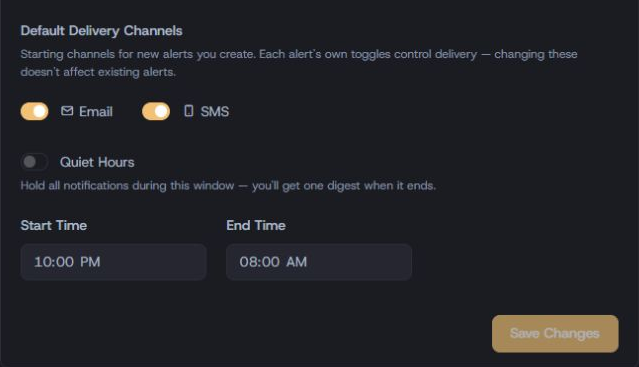
In Delivery defaults, select Email, Text message, or both. Text delivery needs Premium and a phone number. These choices apply to alerts you add during this visit.
Select Add products, or Browse products if your watchlist is empty. Search by product name, weight or item number. Select the bars or coins you want, then choose Add selected products.
Your products appear under Products you follow. A row marked Watching is active; Paused is not. Changes save automatically. If you see Change not saved, use Retry save before leaving.
Each alert has its own email and text choices. To copy your defaults to existing active alerts, use Apply to all active alerts. Paused alerts stay unchanged.
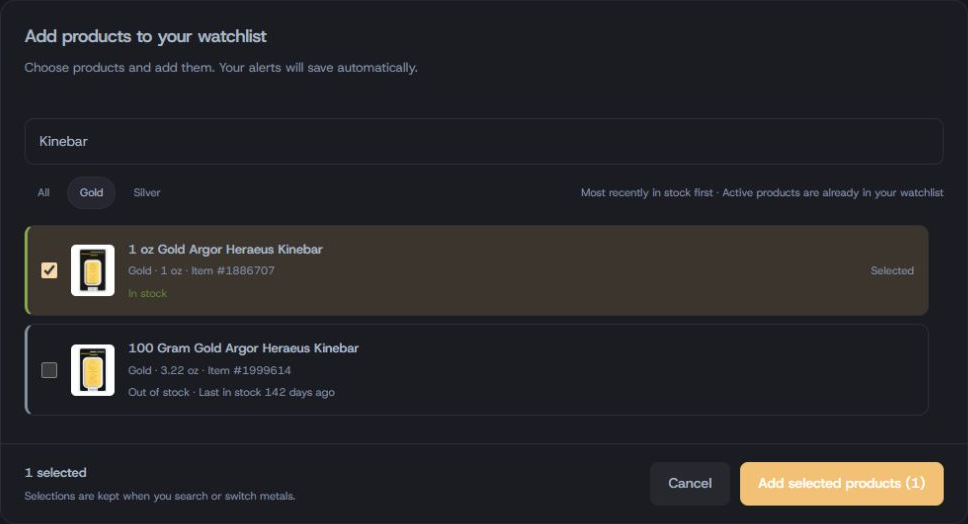
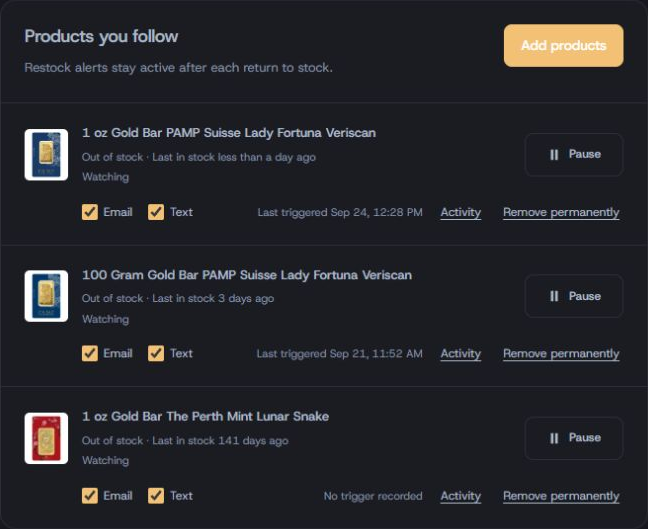
You’re done when: your chosen product says Watching, the save has finished, and its delivery choices are correct.
You may see a setup dialog with that product already selected instead of the watchlist catalog. Confirm the product, choose delivery and save the alert. Starting checkout or creating the account alone does not save it.
Open Costco’s listing if you want to buy now. The alert watches for a future return to stock; it does not send immediately just because you added an available product. It stays active after later restocks.
New arrivals watches for newly discovered gold or silver listings. It does not automatically add those products to your restock watchlist. Add a new product separately if you want to follow its future restocks.
Select Add warehouses, or Find your warehouses on an empty watchlist. Enter your ZIP code and select Search. Results are nearest first; use Show more warehouses to see more.
Check the warehouses you would visit. Under Build your watchlist, choose gold, silver or both, then Email or Text message. On a phone, use Review alerts to reach your selection.
Choose Add warehouses beneath your selection; the button includes the number you selected. Wait for the save to finish. Stores already in your watchlist are labeled so you do not add them twice.
Under Your warehouses, look for Watching. Confirm Alert me about and Send via on each card. Later changes save automatically; resolve any save error before leaving.
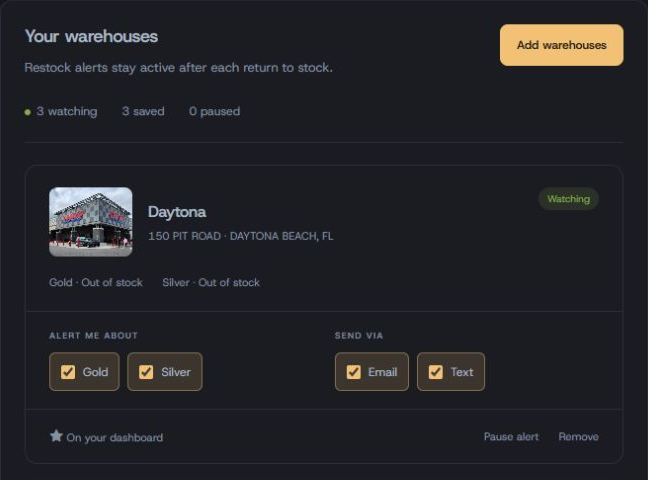
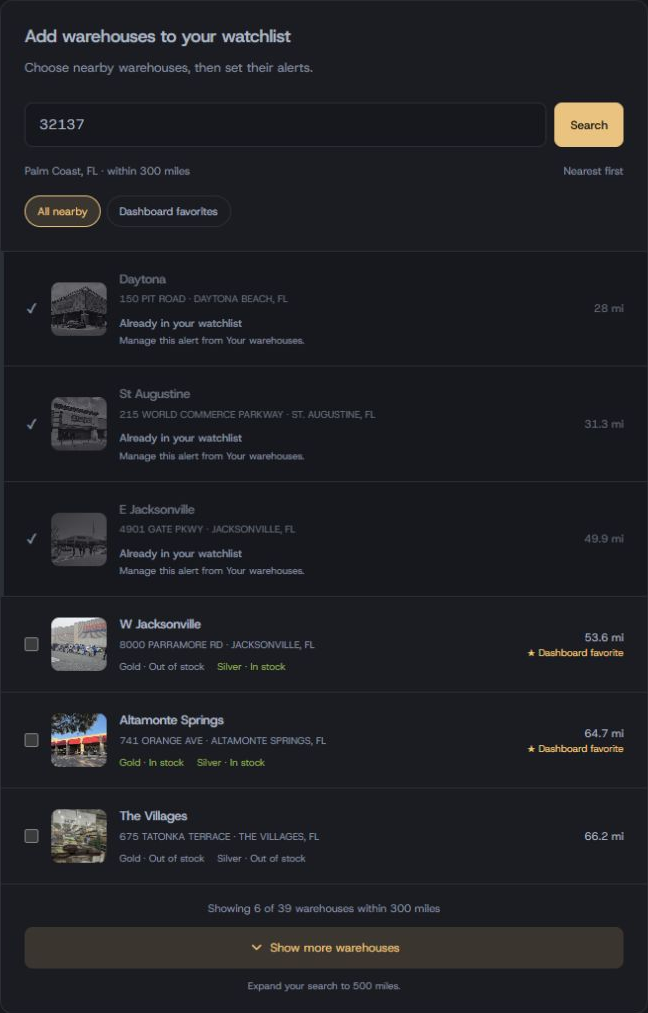
You’re done when: each chosen warehouse has a saved alert with the correct metal and delivery channels. Starring a store adds it to your dashboard; it does not replace saving its alert.
Confirm your email address. For SMS, enter your phone number in the requested format, choose your Time Zone and save the account changes.
Read the description beside Quiet Hours to see which delivery channels it affects. Choose times that suit you and save notification changes. A held message may arrive after the stock has sold out.
Settings defaults seed new alerts; they do not rewrite existing alerts. Return to Online alerts or In-store alerts and check the channel choices on each saved alert.
Before you leave: check that the save succeeded. SMS needs an active Premium trial or subscription; email delivery still needs to be selected on the alert.
Star stores to keep them on your dashboard. Check the recorded stock and observation time before deciding to drive.
Compare product weight, availability, price and premium over spot. An in-stock observation can change before Costco checkout.
Use Online alerts and In-Store Alerts to review delivery, pause watching or change selections. You do not need to leave the dashboard open for a saved alert to run.
You can skip this section and still receive standard restock alerts.
Open Purchase Profiles and enter the rewards and costs that apply to you: card rewards, membership rewards, tax and shipping. Review the saved profile before using its calculations.
A displayed resale margin depends on the dealer bid and your inputs. It is an estimate, not a locked sale or guaranteed return. Use Profit alerts only when you want a threshold-based signal in addition to availability.
Use Spot Price alerts to set a market-price target. This follows the metal price, not a Costco product’s availability. Review the alert’s status after it fires before relying on another notification.
Broker prices compares buying bids. Portfolio helps you record purchases and sales. Neither is required to start receiving restock alerts.
Check the saved alert first, then your delivery settings.
Contact support →A favorite puts the warehouse on your dashboard. Open In-store alerts and check that its card says Watching, has the metal you want selected, and has a delivery channel enabled. A favorite alone is not a saved restock alert.
An online restock alert watches for a future return to stock. Adding an already available product does not trigger an immediate message. Check that the product is Watching, its changes are saved, and email or text delivery is selected.
Check that your Premium trial or subscription is active and that a valid phone number is saved in Settings. Return to the alert screen and refresh it if necessary, then enable text delivery on the alert itself.
Defaults apply to new alerts. Existing alerts retain their own channels. Change the saved alert’s delivery choices, or use Apply to all active alerts on the Online alerts page to copy its delivery defaults to active online alerts.
Stay on the Online alerts page and look for the error message. Use Retry save after resolving the problem. Change not saved means the new choice is not confirmed; do not assume it is active. Discard change returns to the saved choice.
Compare the alert time with when you opened it. Review quiet hours, daily delivery limits, spam folders and device notification settings. Stock can sell out during confirmation or delivery. Check that the alert remains active for another restock; no alert reserves inventory.
Correct product or store. Correct metal. Saved and active. Delivery checked.
You can come back here whenever you add another alert.